
Skillflo Echo · AI executive assistant

Your executive assistant, in every meeting.

Echo preps you before the meeting, cues you with the next question while you talk, and does the work after: the notes, the follow-up draft, the commitments to chase. Ask it anything across every meeting you have had.

No meeting botDesktop captureDrafts wait for you
Three colleagues holding a working meeting around a laptop and an open notebook.
A real meeting stays human. Echo remains on the desktop, out of the room.
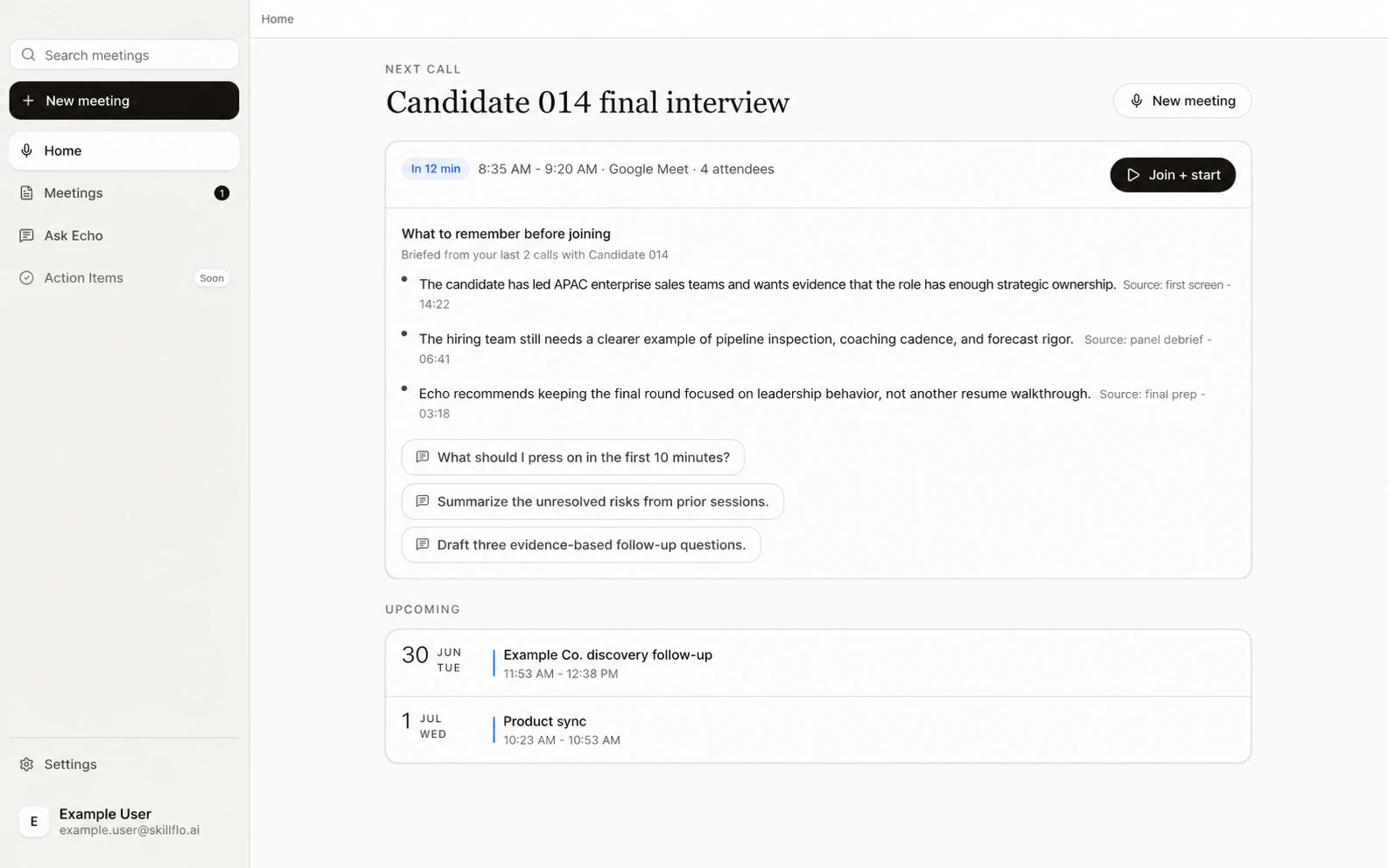
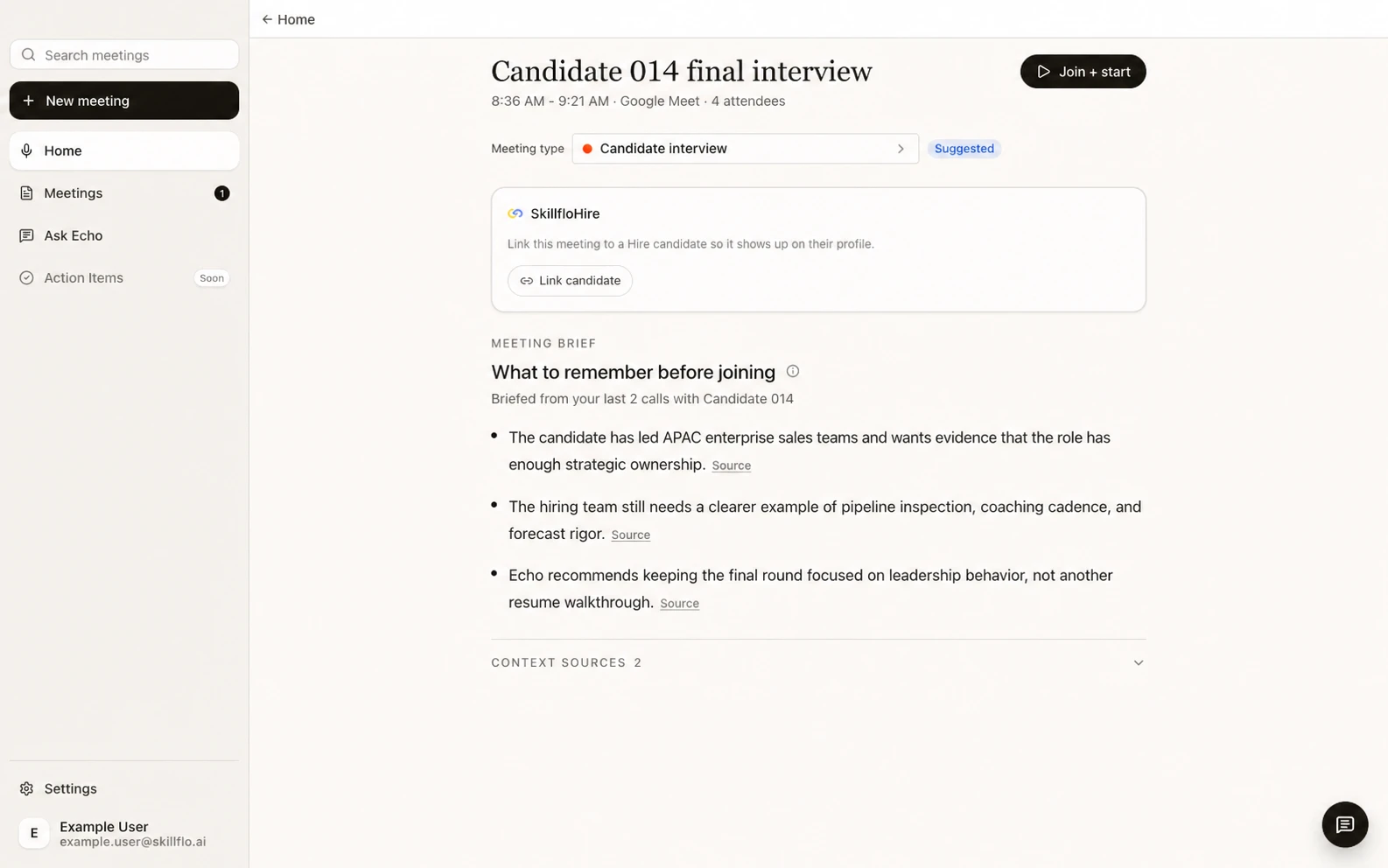
Echo home screen showing an upcoming interview, context from two prior calls, and three suggested questions.
BeforeThe next call opens with what the prior calls left unresolved.

A note-taker writes the meeting down. Echo gets the work done.

Before the meeting it prepares you. During it, it hands you the next question. After it, it writes the record, drafts the follow-up, and carries every commitment forward until someone closes it.

  1. 08:21BeforePreps you
  2. 09:00DuringCues you live
  3. 10:04AfterWrites the record
  4. Next callReturnedStarts with context

One assistant, the whole cycle

Before. During. After. Next.

Echo prepares you, helps during the meeting, then finishes the work the meeting creates. Each one starts with what the last one left open.

Echo pre-call brief with source-linked context from two prior calls and a suggested meeting type.

08:21 · Before

Your brief is ready before you are.

Echo reads the prior meetings with the same people or account, writes a short brief, and drafts three to five questions to ask. Connected to Skillflo Hire, it adds the résumé and job description itself.

  • Each line of the brief points back to the meeting it came from.
  • Open questions return while there is still time to ask them.
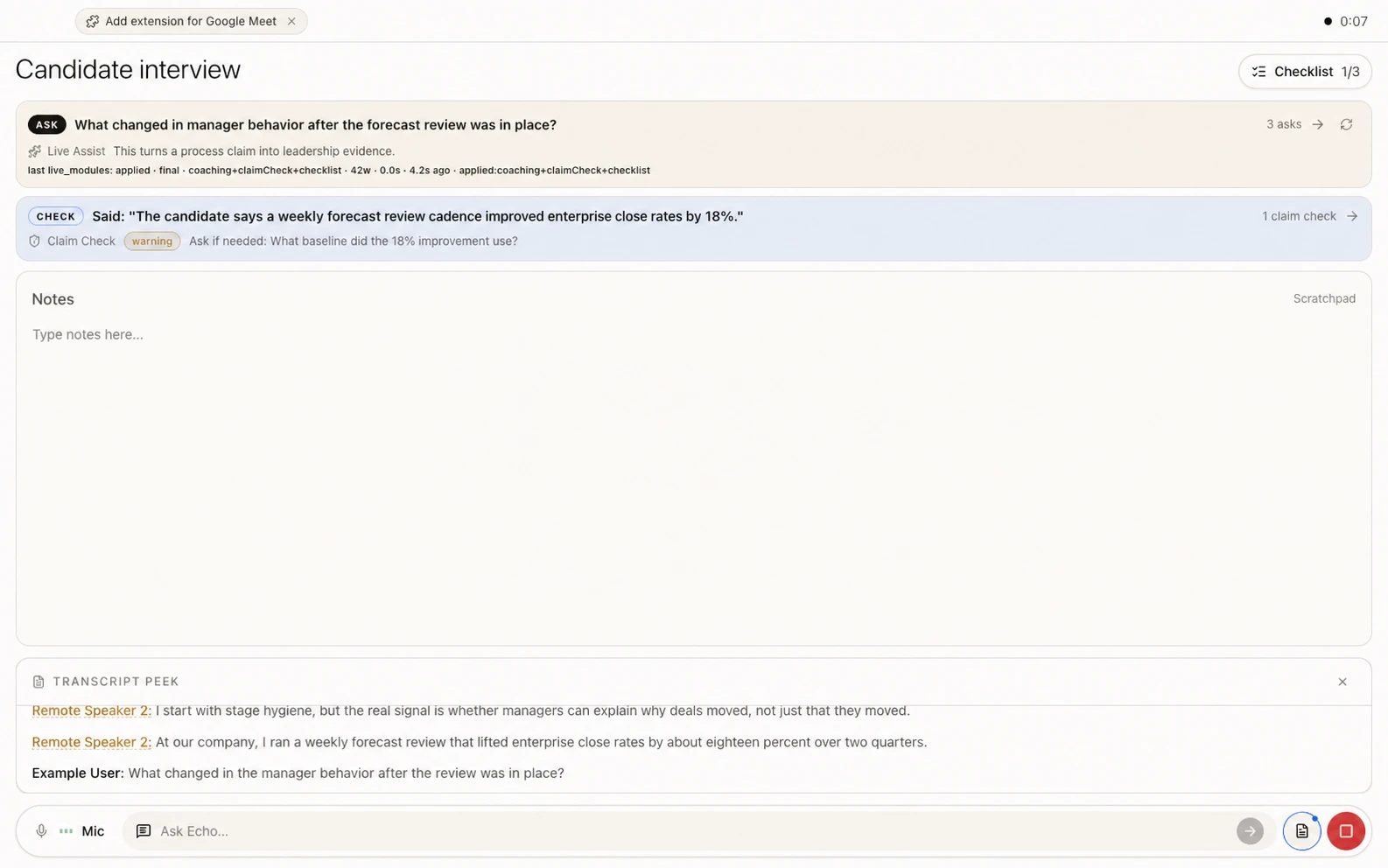
Echo live meeting workspace showing notes, a follow-up question, checklist progress, a careful claim check, and transcript preview.

09:00 · During

It listens, and hands you the next question.

Your notes stay front and center. Around them, Echo runs what the Meeting Type asks for: Live Assist for the next question, Claim Check for statements to verify later, a checklist that fills in as topics get covered, and a grade on each prepared question as it gets answered.

  • Nothing joins the call. Echo captures from your desktop.
  • Ask Echo answers mid-call, with the conversation so far already in context.
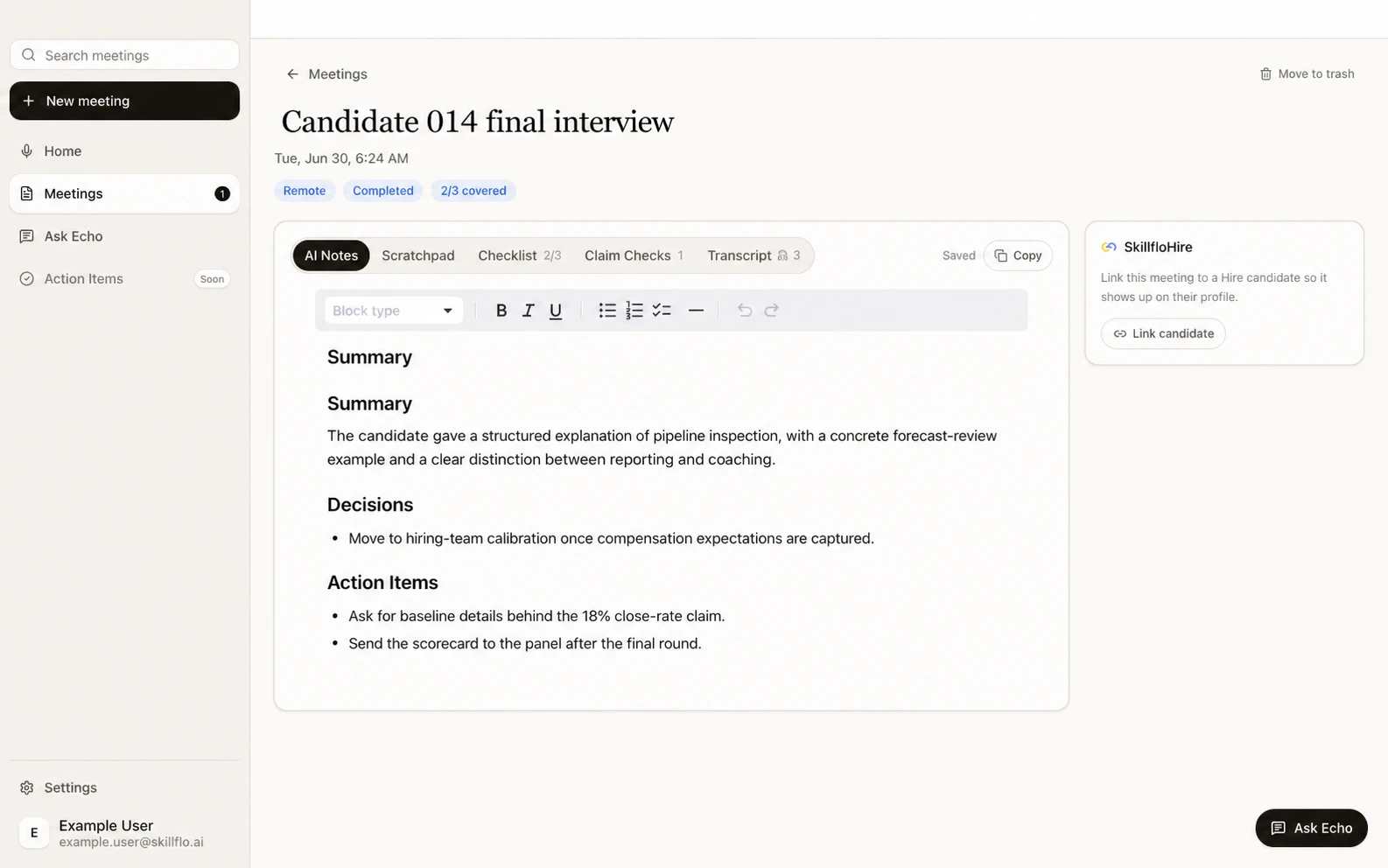
Echo saved meeting record with notes, decisions, explicit action items, checklist, claim checks, and transcript evidence.

10:04 · After

The meeting ends. Echo starts the follow-up work.

Minutes later the record is written: summary, decisions, action items, and a follow-up email draft when the meeting type calls for one. Every explicit commitment becomes a task with the quote it came from. Linked interviews land in Skillflo Hire on their own.

  • Only explicit commitments become My Tasks.
  • The record becomes context for the next Precall Brief.
Echo next-call brief returning source-linked context and unresolved questions from earlier meetings.

Next call · Returned

The meeting ends. The thread does not.

What mattered returns at the next useful moment, with the source meeting attached.

  • Recall stays scoped to the right relationship.
  • The person in the meeting decides what becomes official.

Live Assist

Notetakers work after the call. Echo works during it.

Live Assist reads where the conversation is going and cues you while there is still time to act: the follow-up worth asking, the topic not yet covered, the claim that deserves a second look. You set how often it speaks.

Suggested question · 09:18Short enough to say in one breath, on your screen while the other side is still talking. Good ones wait in the backlog.

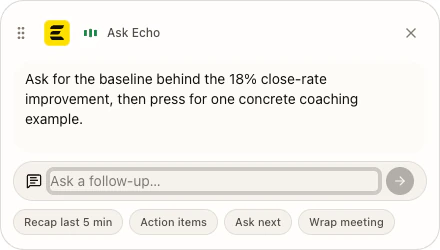
Compact Echo assistant offering one follow-up question and quick actions while the meeting stays in focus.
One next question. The rest of the screen stays quiet.

Cue frequency · yoursQuiet, balanced, or active. Turn it off, or change it mid-call, without leaving the meeting.

Source-backed memory

Every useful line keeps a way home.

Echo remembers through meetings you can reopen and inspect. People, accounts, threads, and commitments stay tied to the meetings that created them.

Person

Prior calls with the same person

Preferences, open questions, stated constraints, and explicit commitments.

Inspect source
Account

Context across one company

Decisions and unresolved threads can return even when the next call has different attendees.

Correct or move
Thread

A recurring meeting series

Earlier sessions in the same series can brief the next session in that line of work.

Keep scoped
Commitment

What someone explicitly agreed to do

My Tasks carries the originating meeting and quote alongside the commitment.

Close or reopen
Notion

Connected workspace context

Ask Echo can use an enabled Notion source alongside meetings and durable Memory.

Connect or remove
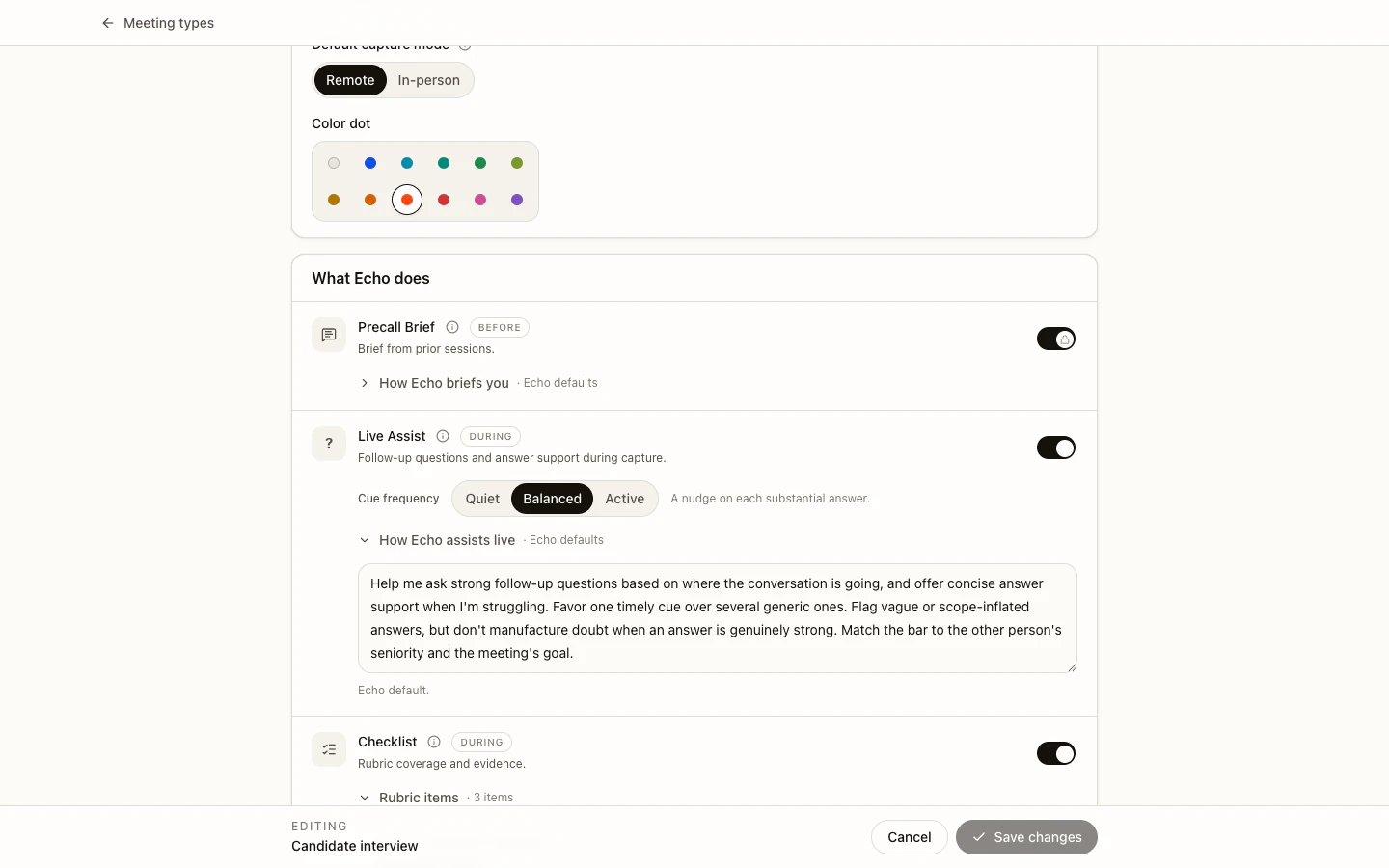
Echo Meeting Type editor configuring the Precall Brief, Live Assist, and Checklist modules for an interview.

Meeting Types

Same assistant. A different job for each meeting type.

Pick the setup once, before the call. Echo loads the right modules and instructions for that kind of conversation, and nothing else.

  1. 01GeneralNotes and Ask Echo
  2. 02InterviewCoverage, Live Assist, and Claim Check
  3. 03CustomerCommitments and a follow-up draft
  4. 04Your ownGuidelines that match the work

Ask Echo

An assistant you can hand work to.

Ask Echo is your own agent. It has every meeting, every commitment, and any document you connect. Give it a question or a job and it works until it is done: a brief on an account, what you owe each person this week, what two candidates said about the same topic.

Recall

Find what was said, and by whom

Searches every summary and transcript by meaning, and quotes the line with its timestamp.

Check the quote
Follow-up

What each person owes, and what you owe them

Commitments, decisions, and open threads, by person or by date, with the meeting they came from.

Close or reopen
Documents

Read the pages and files you pick

Notion pages and imported files join the same memory. Nothing you did not choose.

Add or remove
Research

Longer jobs run in the background

Give it a job that takes minutes, keep working, and the answer streams back as it finishes.

Cancel any time
Files

Work from what you hand it

Attach a PDF, document, spreadsheet, or recording and ask about it in the same thread.

Stays in your account

Trust, in the workflow

Quiet by design. Clear about control.

Echo prepares, listens, drafts, and remembers. You still own the conversation, the judgment, and what becomes official.

01 · Capture

No bot enters the room.

Echo captures from the desktop instead of joining as another meeting participant.

02 · Trace

Useful context keeps its source.

Brief bullets and remembered facts retain a path back to the Saved Session they came from.

03 · Control

You decide what stays.

Correct, move, or forget remembered context. Recording is optional and has its own retention controls.

See Echo on your workflow

Bring us one week of your meetings.

Show us the prep, the calls, and the follow-ups they create. We will show you how much of that work Echo takes on.